Abandoned Call Cap Pacing Profile
Abandoned call cap profiles allow you to set:
- The maximum number of calls allowed for the selected queue
- The initial number of simultaneous outbound calls per agent
- Dynamic pacing parameters aimed at keeping the level of abandoned calls below a specified threshold.
Use the Queue field to select the queue.
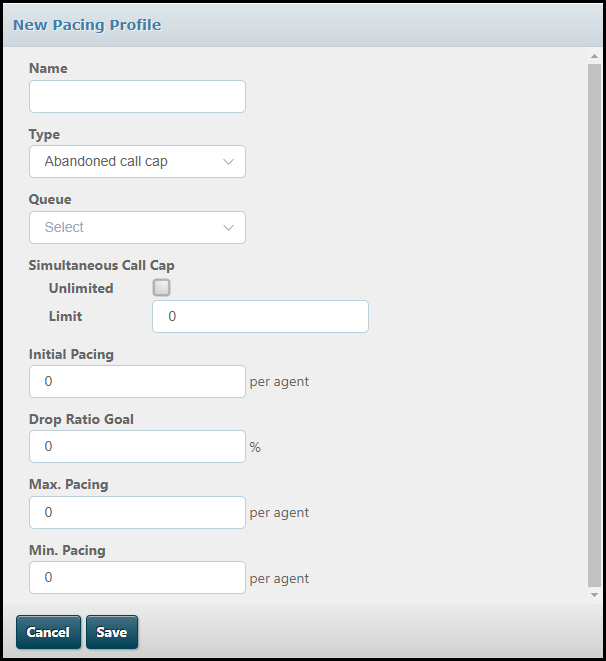
To set a maximum number of calls for the selected queue, clear the Unlimited check box, then enter the number into the field that appears. If you leave the Unlimited check box selected, the system will allow the campaign to make as many outbound calls as the organisation cap permits.
Enter the number of simultaneous calls per agent into the Initial Pacing field.
The following fields are then used to define the dynamic pacing to be applied at run-time.
|
Field |
Description |
|
Drop Ratio Goal |
For abandoned call pacing profiles, the drop ratio goal (which is the maximum number of abandoned calls that is to be tolerated, as a percentage). |
|
Max Pacing |
For abandoned call pacing profiles, the maximum number of simultaneous calls to be generated per agent. |
|
Min Pacing |
For abandoned call pacing profiles, the minimum number of simultaneous calls to be generated per agent. |
At run-time, the service uses the value entered here in the Initial Pacing field to determine how many calls it should generate per agent at the start of the campaign. As the campaign progresses, call outcomes allow the service to monitor how many abandoned calls there have been and adjust the number of simultaneous calls generated per agent accordingly, within the maximum and minimum figures defined here.