Pacing Profiles
Pacing profiles are set up using the Outbound > Pacing Profiles menu option and provide a means to control the rate at which calls are generated and handled while a campaign is active.
A pacing profile can be used to:
- Provide a cap on the number of simultaneous outbound calls generated by the system.
- Allow the rate at which outbound calls are generated to be configured according to agent availability.
- Specify a target percentage rate for abandoned calls (outbound calls that were answered by a customer but not connected to an agent within a given time) and set the maximum and minimum number of calls per agent that the system will generate in trying to reach that goal. Call outcomes are continuously monitored and the call rate adjusted, in real time, to keep the abandoned call rate within the limit specified. (In the UK, Ofcom requires that for any campaign, no more than 3% of unsolicited outbound calls fall into this category).
- Allow an agent to preview details of the target before deciding whether to place the call. The details displayed are derived from the contact list built using the DATA MANAGEMENT application.
You can associate a pacing profile with a specific outbound queue, and reference this queue in the Route to Contact action cell or OUTBOUND service template that controls the outbound campaign. When creating an outbound service, you choose which pacing profile to use for that service.
Pacing profiles are of the following types:
|
Pacing Profile |
Description |
|
New calls are initiated as quickly as possible, but subject to an overall simultaneous call limit. |
|
|
New calls are initiated at the point where agents for the campaign become available, and at a static rate according to the number of available agents. |
|
|
New calls are initiated at the point where agents for the campaign become available, and at a rate which is governed by:
|
|
|
Customer records are presented to agents within DTA, with calls then initiated by the agent either manually, or automatically after a configured timeout. |
|
|
New calls are initiated at a rate which is governed by the output of the predictive dialling algorithm for the campaign. The following configuration options will be available: Queue: the queue which will be targeted by the OUTBOUND campaign. Queue selection will be restricted to predictive queues, as defined in UC. Note: queue selection is restricted to predictive queues, as defined in UC. Simultaneous call cap: an optional limit on the number of simultaneous outbound calls in progress. Drop ratio goal: an abandoned call rate deemed admissible for the campaign, in order to maximise agent occupancy. The following parameters will be used in cases where OUTBOUND deems that there are insufficient statistics available for the campaign. Expected call success rate: the percentage of calls which are expected to connect successfully. Expected call handling time: the expected call handling time for a call which is successfully connected to an agent, including any post-call time (wrap). |
Pacing profiles are set up using the Outbound > Pacing Profiles menu option.
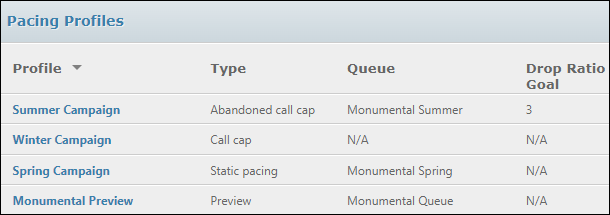
The screen displayed when you select this option lists information about existing pacing profiles.
Within this screen:
- If you click on an entry's name, a window is opened showing existing values for the pacing profile, which you can amend. Click the Save button to save any changes you make, or the Cancel button to close the window without saving your changes.
- You can delete one or more pacing profiles by selecting the check box on the line of the profile you wish to delete, then clicking the Delete Selected button. You will be prompted to confirm the deletion, after which the selected profiles are removed from the list.
To set up a new pacing profile, click the + New Profile button.
Provide a unique name for the pacing profile in the Name field, then use the drop-down list on the Type field to select the type of pacing profile you wish to set up. The screen changes, depending on the pacing profile you select.
For all types, click the Save button to save input, or the Cancel button to close the screen without saving your changes.